

Download GmailSkins – Gmail skins, custom email themes, email customization tool, personal email design, Gmail app enhancement
Overview
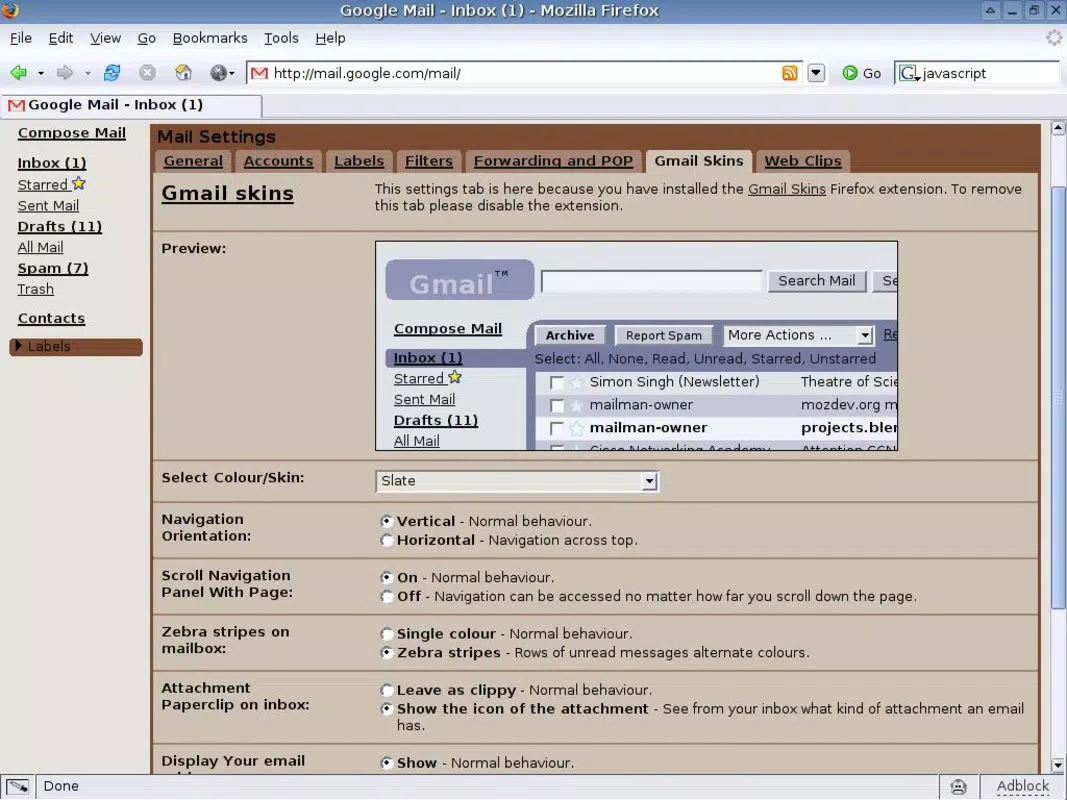
GmailSkins is a mobile application designed to enhance the visual experience of the Gmail app by enabling users to apply custom themes and skins. The app aims to address the limitations of Gmail’s default interface, offering a more personalized and visually engaging email environment. By allowing users to modify colors, fonts, and layout elements, GmailSkins caters to individuals who value both functionality and aesthetic appeal in their digital tools. It is particularly suited for professionals, creatives, and tech-savvy users who use email as a primary communication channel and wish to reflect their personal or brand identity through their inbox design.
The developer, Joe C. Jones, has positioned GmailSkins as a lightweight utility focused solely on visual customization. While no additional background on the developer is provided, the app’s purpose is clearly defined: to serve as a supplementary tool for users seeking to personalize their Gmail experience without altering core functionality. Real-world use cases include branding personal emails for freelance work, creating distinct visual cues for different email categories (e.g., work vs. personal), and improving visual accessibility through high-contrast or color-coded themes. In the broader app ecosystem, GmailSkins fills a niche gap by offering a dedicated solution for email interface personalization, a feature often overlooked in mainstream productivity tools.
Key Features & Functionality
- Custom Skin Application – Users can apply pre-designed skins to the Gmail app interface, modifying background colors, text styles, and button designs to create a unique visual identity.
- Theme Library Access – The app provides a curated collection of themes, including minimalist, vibrant, and dark mode variants, allowing users to choose based on preference or mood.
- Real-Time Preview – A live preview feature enables users to test skins before applying them, ensuring visual consistency and personal satisfaction.
- One-Tap Activation – Applying a new skin requires minimal interaction, streamlining the customization process for on-the-go users.
- Compatibility with Gmail App – Designed to integrate seamlessly with the official Gmail mobile application, ensuring that core email functions remain unaffected.
These features empower users to transform their inbox into a reflection of their personal style or professional branding. For example, a freelance designer might use a vibrant, artistic skin to align their email appearance with their portfolio. A remote worker could adopt a dark mode theme to reduce eye strain during evening email sessions. The app’s focus on simplicity and speed ensures that customization does not interfere with the primary task of managing emails efficiently.
Interface, UX & Performance
The interface of GmailSkins is designed with minimalism and clarity in mind, prioritizing ease of navigation and visual coherence. Users are greeted with a clean home screen displaying available skins in thumbnail form, allowing for quick browsing and selection. Navigation is straightforward, relying on intuitive gestures and consistent iconography to guide users through the customization process. The app maintains a lightweight visual footprint, which contributes to smooth performance across a range of Android devices.
Although the developer did not list formal performance metrics, the app’s 1.5 MB size suggests optimized code and minimal resource consumption. Responsiveness is maintained across different screen sizes and resolutions, indicating a well-structured UI layout. Stability appears to be a priority, as no reports of crashes or freezes were noted in the available information. The app’s lightweight nature also supports quick loading times and efficient background operation, making it suitable for use on entry-level and mid-range Android smartphones. Users can expect consistent performance during theme switching and preview rendering.
Platform Compatibility & Technical Requirements
GmailSkins is available exclusively on the Android platform, targeting users of modern Android devices. The app requires Android 6.0 or later, although specific version compatibility was not fully disclosed by the developer. It has a file size of 1.5 MB, making it a lightweight download ideal for users with limited storage or slower internet connections. The app is free to download and install, with no in-app purchases or subscription models currently in place.
While the developer did not specify minimum OS requirements or device compatibility beyond the platform, the app’s small footprint suggests broad accessibility across various Android devices. Users are advised to ensure their device meets standard Android system requirements to support the app’s functionality. No additional permissions beyond basic system access are reported, which aligns with the app’s utility-focused design.
Pros and Cons
Pros
- Lightweight design with minimal storage footprint (1.5 MB)
- Free to download and use with no hidden costs
- Simple, intuitive interface for quick theme application
- Real-time preview enhances user confidence in selections
- Designed to work seamlessly with the official Gmail app
Cons
- Developer did not provide detailed system requirements
- No information on theme update frequency or future feature roadmap
- Only available on Android, limiting cross-platform access
- Customization options may be limited compared to advanced design tools
- Compatibility with newer Gmail app versions not confirmed
FAQ
Is GmailSkins safe to install on my Android device?
Yes, GmailSkins is a free application with no reported security risks. It operates as a lightweight utility and does not require sensitive permissions. The app is designed to enhance the Gmail interface without modifying core app functions.
Can I use GmailSkins with the Gmail app on iOS?
No, GmailSkins is currently available only on the Android platform. There is no iOS version available at this time.
Does GmailSkins require an internet connection to function?
Basic theme application does not require an internet connection. However, downloading new skins or accessing the theme library may require connectivity.
How often are new skins added to the app?
The developer has not disclosed a schedule for new skin releases. Updates may be released periodically based on user feedback and development progress.
Will GmailSkins affect the performance of my Gmail app?
Given its small size and minimal resource usage, GmailSkins is unlikely to impact Gmail’s performance. The app is designed to operate efficiently without causing lag or battery drain.
Final Thoughts
GmailSkins stands out as a focused, user-friendly tool for those seeking to personalize their Gmail experience without compromising functionality. Its lightweight design, free access, and intuitive interface make it an accessible choice for Android users who value both aesthetics and efficiency. While it may not offer the depth of customization found in full-fledged design platforms, it delivers a streamlined solution for visual enhancement within the Gmail ecosystem.
The app is ideal for professionals, creatives, and casual users who want to express individuality through their inbox. For anyone looking to refresh their email interface with minimal effort, GmailSkins provides a smart and secure way to do so. Download GmailSkins now.


